 HOME
ABOUT
CONTACT
HOME
ABOUT
CONTACT
 Rain
Rain
 September 19, 2026
Following the previous article, Animation Controller - Combo, I felt it was time to refactor the Animation Module. This was a substantial project. Fortunately, using Claude significantly improved the efficiency of the refactoring, and I also performed overall profiling. I would like to record some of the process in this article.
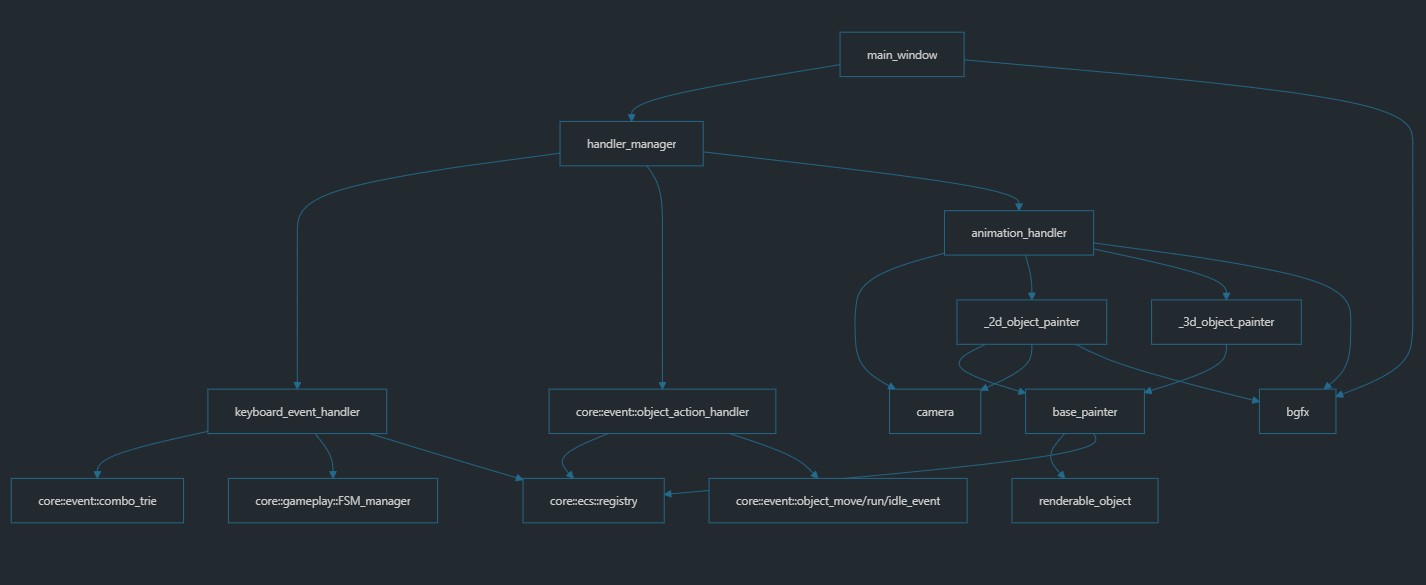
This time, I removed the responsibilities previously handled by the all-in-one Object Painter and distributed them among Animation Handler (Manager), 2D/3D Object Painter, Renderable Object, Camera, and the viewport-related responsibilities in Main Window (GUI Widget).
Like the other handlers, such as Keyboard Event Handler and Object Action Handler, Animation Handler is called through execute() in the main animation loop so each component can perform its own responsibility. This design uses the Strategy Pattern.
The 2D/3D Object Painter classes are aggregated by Animation Handler. When execute() is called, the two painters are responsible for drawing 2D and 3D objects respectively. Currently, only the 2D Object Painter has been implemented.
Renderable Object contains VBO, VAO, Texture, and Sprite Sheet structures. The Texture and Sprite Sheet vary according to the state of the object. This class owns important animation data and is one of the key elements in the Combo system.
In the future, Camera will likely be divided into two different camera types: one for Animation (World) and perspective projection, and another for GUI Widget and orthographic projection. Painters will be divided in the same way. At present, only the Animation side has been implemented; the second type will be added when GUI Widget development begins.
As for the viewport, there are not many related APIs, so Main Window currently handles clearing the entire canvas.
The relationship between the refactored classes and modules is shown below:
Last updated: